Home
About Us
Marketing
Equipment
FAQs
Support
Contact
Support Portal
Schedule
Knowledge Base
SMS Registration
Integrations
Home
About Us
Marketing
Equipment
FAQs
Support
Contact
Support Portal
Schedule
Knowledge Base
SMS Registration
Integrations
Sign in
Get Started
Home
Knowledge Base
Counter Service
Miscellaneous
How to Reset your Order Number
How to Reset your Order Number
Navigate to your merchant account at
basilbackoffice.com
.
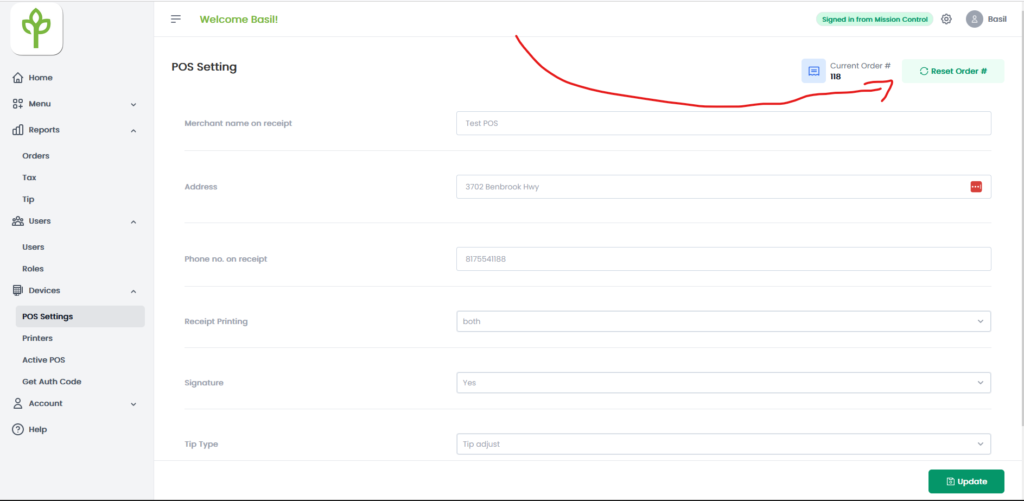
Select the Devices drop down then select POS Settings.
Select Reset Order #.
This will start the next POS order at 1.
Visual
What are your feelings
Happy
Normal
Sad
Share This Article :
Still stuck? How can we help?
How can we help?
Name:
*
Email:
*
Message:
*
Manually Updating your BasilPOS
Credit Card Reader Connecting to a Hidden Network (QD4)
We use cookies to ensure that we give you the best experience on our website. If you continue to use this site we will assume that you are happy with it.
ACCEPT