Home
About Us
Marketing
Equipment
FAQs
Support
Contact
Support Portal
Schedule
Knowledge Base
SMS Registration
Integrations
Home
About Us
Marketing
Equipment
FAQs
Support
Contact
Support Portal
Schedule
Knowledge Base
SMS Registration
Integrations
Sign in
Get Started
Home
Knowledge Base
Counter Service
Daily Use
Sales Reports
Sales Reports
Log in at basilbackoffice.com.
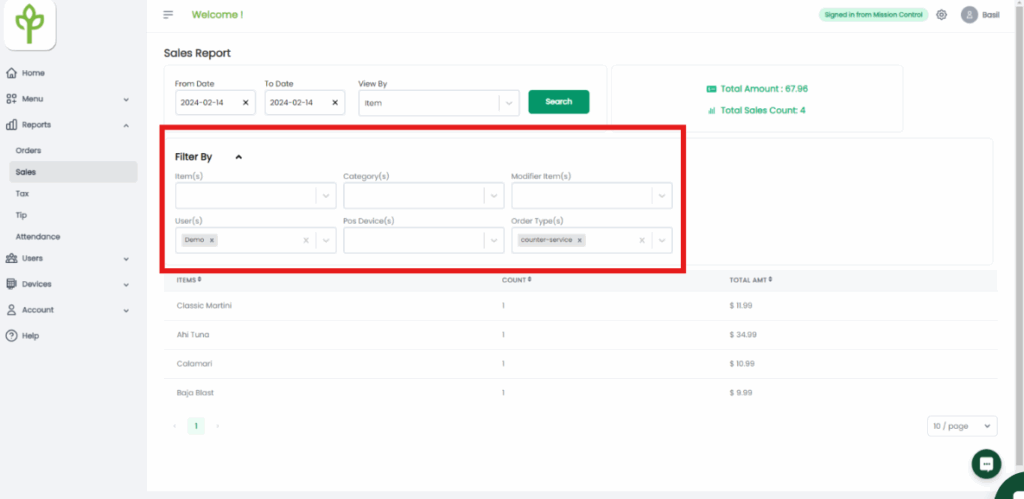
Open the Reports drop-down → select the Sales tab.
Filter by date and choose your preferred view (e.g., by items).
In the top right, the Total Amount shows the subtotal (excludes tax, fees, tips, and discounts).
Total Sales Count = number of times the item was sold.
Use advanced filters to view data by:
Items, Categories, Modifier items, Users, POS device, and Order types.
What are your feelings
Happy
Normal
Sad
Share This Article :
Still stuck? How can we help?
How can we help?
Name:
*
Email:
*
Message:
*
Tax/Fee Reports
Quick Table Service
We use cookies to ensure that we give you the best experience on our website. If you continue to use this site we will assume that you are happy with it.
ACCEPT