
The User Shift Report provides a detailed summary of an individual user’s activity during a shift. This report is commonly used for payroll tracking, tip accountability, and end-of-shift balancing.
How to Print/Send a Shift Report:
To generate a Shift Report just follow these steps:
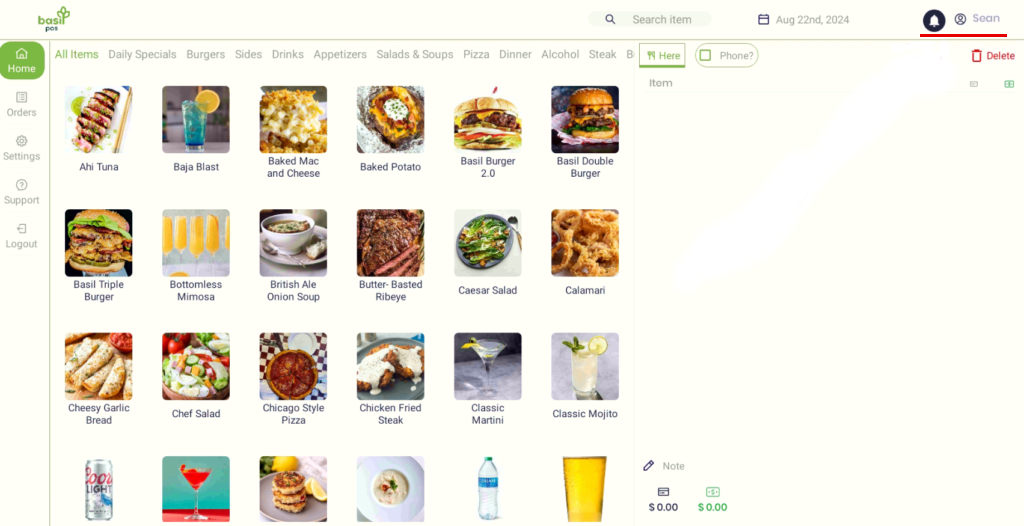
- While signed in to the POS, tap the user’s name in the top right.
- Select End Shift.
- A printed report will come from the terminal chosen in Settings.
- The system will then clock the user out automatically.
- A printed report will come from the terminal chosen in Settings.
- If the user has an email linked to their account, a copy of the shift report will also be sent automatically via email.
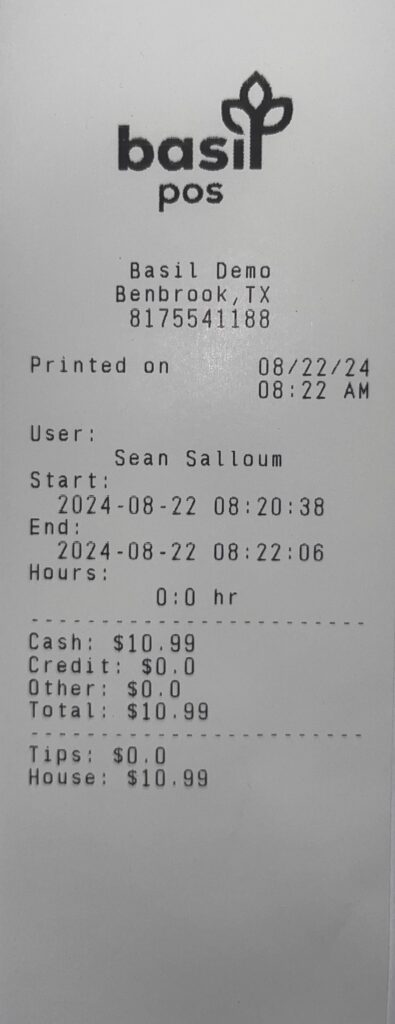
What the User Shift Report Shows
User & Shift Details
This section includes:
- User name (the employee logged into the POS)
- Shift start and end time
- Total hours worked
Hours are calculated based on when the user logs in (clocks in) and logs out (clocks out) of the system.
Payment Totals
The report displays totals for transactions processed by the user during their shift:
- Cash – Total cash payments handled
- Credit – Total card payments processed
- Other – Any additional payment types
- Total – Combined total of all payment types
Only transactions completed while the user was logged in are included.
Example Printed Shift Report
Tips
- Shows the total amount of tips associated with the user’s transactions.
- Includes tips added at checkout or through tip adjustment (once settled).
House (What the User Owes the House)
- The House amount represents what the user owes the business at the end of their shift.
- Credit card tips are subtracted, since those tips are paid electronically rather than from the cash drawer.
This helps ensure accurate drawer balancing and tip reconciliation.
Important Notes About Login, Logout, and Tip Settlement
Logging In and Out Is Required for Accurate Hours
- If a user does not log in or log out properly, their hours will not appear on the User Shift Report.
- This can result in missing or incorrect time records.
Tip Adjustment Is Required for Tip Reporting
- Tips must be adjusted and settled before the settlement closes for the night.
- Once the settlement is closed, tips can no longer be added or adjusted for those transactions.
- Tips that are not adjusted before settlement are extremely difficult to recover, and in many cases cannot be applied back to the original payment.
If a user does not adjust tips before settlement closes:
- Tip amounts may not appear on the User Shift Report
- Tip amounts may not be reflected on end-of-day or settlement reports
To ensure tips are reported correctly:
- Tips must be finalized before the shift ends
- Users should complete their settlement process before logging out
Best Practices
- Always log in at the start of a shift
- Always log out at the end of a shift
- Ensure tips are adjusted before ending the shift
Following these steps ensures accurate reporting for hours worked, tips earned, and end-of-day reconciliation.
If you have questions or need help reviewing User Shift Reports, our support team is happy to help.


